---
title: How To Access FlowPath From Your Mobile Device | FlowPath Help Center
description: FlowPath Knowledge Hub
---
[Skip to content](https://helpcenter.getflowpath.com/how-to-access-flowpath-from-your-mobile-device-flowpath-help-center#main-content)
[](https://www.getflowpath.com/)
Open main navigation
Close main navigation
How can we help you?
- There are no suggestions because the search field is empty.
1. [FlowPath Knowledge Hub](https://helpcenter.getflowpath.com/?hsLang=en-us)
2. [General Setup](https://helpcenter.getflowpath.com/general-setup?hsLang=en-us)
# How To Access FlowPath From Your Mobile Device | FlowPath Help Center
### How To Access FlowPath From Your Mobile Device
In this article learn how to access FlowPath from your phone or mobile device.
January 21, 2026
### How to Login + Reset Your Password
Users should log in by using this link: [https://app.getflowpath.com/login](https://app.getflowpath.com/login)
First time users should click the reset password button at the bottom to set their password.
[.png)](https://downloads.intercomcdn.com/i/o/585091009/bdb15ea6c230826b9876e8a8/Untitled+design+%286%29.png?expires=1784232000&signature=7e7d130c5ca6d911c9c489fb0c3daee50e2ee10ac39476cc48025d958a1b2c61&req=cSgiFsB%2FnYFWFb4f3HP0gDAr2hRMSypfZoujhPx7s4JbX2j91YgyydNEIbE2%0APYH%2BkV7JtehLi7KxZA%3D%3D%0A)
### FlowPath is a web based application, meaning no app download is required.
Open your device's browser and type in: [https://app.getflowpath.com/login](https://app.getflowpath.com/login)
### **On iPhone/iPad (Safari):**
Once you have loaded the FlowPath log in screen and **logged in** in your Safari browser click the share button in the bottom center of the screen. From the menu scroll down to the 'Add to Home Screen'
[.png)](https://downloads.intercomcdn.com/i/o/585091092/6b74455c1fdd754e60caf674/Untitled+design+%285%29.png?expires=1784232000&signature=6c8b811501092312cef25215936110082f04c06a65afd6462a00c398da2e2ef2&req=cSgiFsB%2FnYhdFb4f3HP0gKsByIz7czY%2FzBZ%2FnbaK0AhUDmjgVSkKOp%2Bv3mN5%0AgxU%2BSq6jNG6ZbU08tg%3D%3D%0A)
From there the below (left) screen will pop up. Click the 'Add' button in the top right hand corner and the FlowPath bookmark will be added to your home screen. Now you can simply access FlowPath by clicking the icon on your home screen.
[.png)](https://downloads.intercomcdn.com/i/o/585091488/36c78e6bd8611e9ef981c73c/Untitled+design+%287%29.png?expires=1784232000&signature=7fe03b6159c7ecea7a8cf205373baa33223efb81d8d84770b35ea7d08c403407&req=cSgiFsB%2FmYlXFb4f3HP0gBtIQS%2FH%2Fd1tyqcxMYcb8upFb2uVxPAxwqGqNBYs%0AAHnVbI4RKo%2BIEmNSMg%3D%3D%0A)
### **For Android (Chrome):**
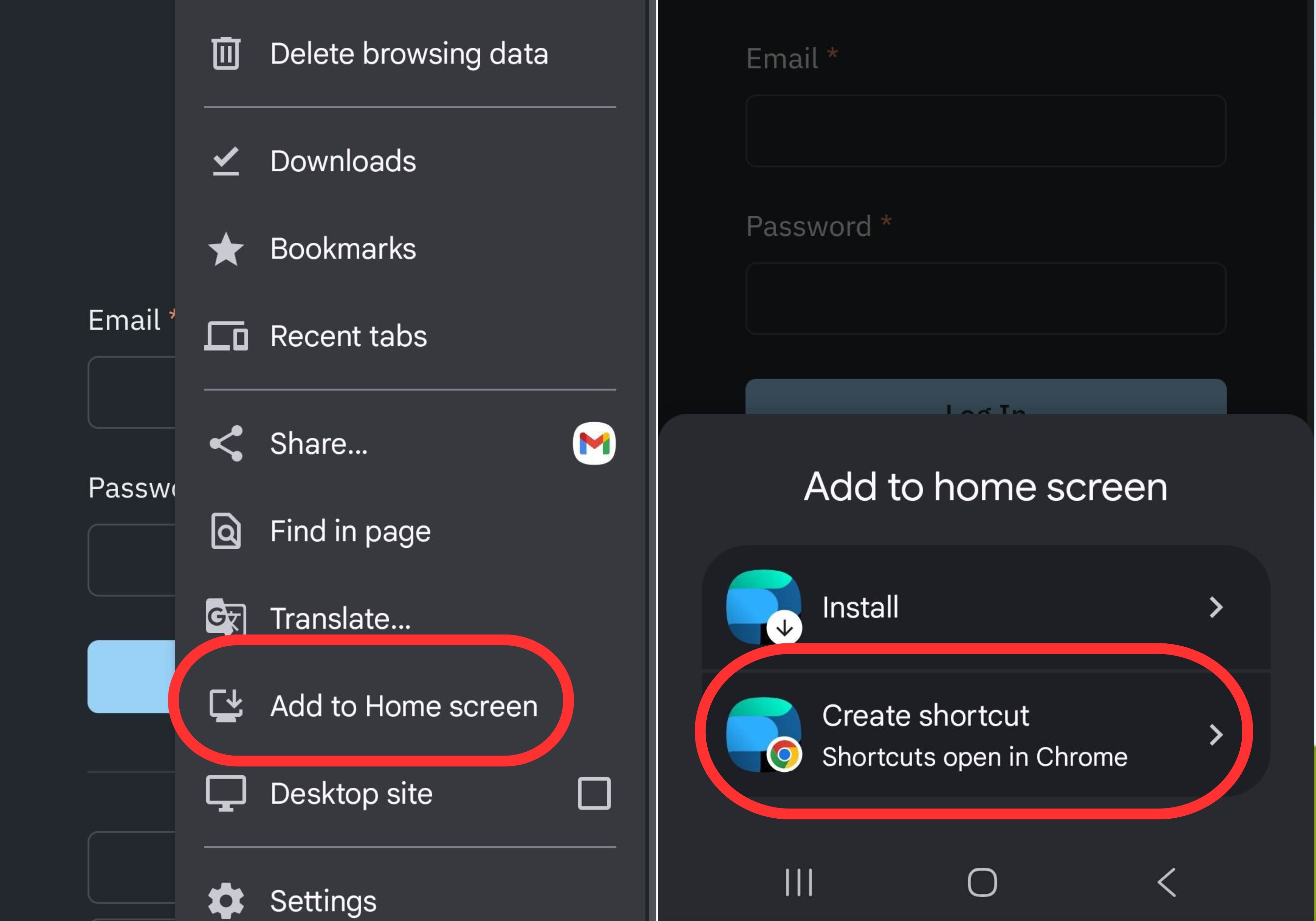
Once you have loaded the FlowPath log in screen and **logged in** in your Chrome browser click the share button in the top right hand corner of the screen. From the menu scroll down to the 'Add to Home Screen'. Click the 'Create Shortcut' button in the bottom pop up.
[](https://downloads.intercomcdn.com/i/o/vrjn9zxh/1970449731/9671a0ecdbee18c6ce5e85fa872a/Untitled+design.jpg?expires=1784232000&signature=ccd318df83c1f72ecca23da47daeae19bd7d2b5587ac735fa927a3bf313716c2&req=dSkgFs16lIZcWPMW1HO4zdDlpfQAJ16MJuv0vSSIMIq1ZgxBAWDu94deCYpB%0A297bXS%2FhN1hvK95ImXM%3D%0A)
From there the FlowPath bookmark will be added to your home screen. Now you can simply access FlowPath by clicking the icon on your home screen.
[.png)](https://downloads.intercomcdn.com/i/o/585092169/17dae002c4b47b76215ccb61/Untitled+design+%289%29.png?expires=1784232000&signature=804f54e3d91b0342df5ff4b6065975cf4f6c5ba8371f2f94ec09c0af51210f6e&req=cSgiFsB8nIdWFb4f3HP0gLt76KkzgD4PXDZv6dPW7ErXC2yCtiB9SlVfnV3A%0A5%2FFoqVWNt%2BOqSoQZEA%3D%3D%0A)
-
-
-
-
-
- [FCA Module](https://helpcenter.getflowpath.com/fca-module?hsLang=en-us)
- [Projects](https://helpcenter.getflowpath.com/projects?hsLang=en-us)
- [All About AI Assistant](https://helpcenter.getflowpath.com/all-about-ai-assistant?hsLang=en-us#main-content)
- [Settings](https://helpcenter.getflowpath.com/all-about-ai-assistant?hsLang=en-us#settings)
- [How best to use FlowPath AI](https://helpcenter.getflowpath.com/all-about-ai-assistant?hsLang=en-us#how-best-to-use-flowpath-ai)
- [Inspections](https://helpcenter.getflowpath.com/all-about-ai-assistant?hsLang=en-us#inspections)
- [PM Schedules](https://helpcenter.getflowpath.com/all-about-ai-assistant?hsLang=en-us#pm-schedules)
- [Asset Reservations](https://helpcenter.getflowpath.com/all-about-ai-assistant?hsLang=en-us#asset-reservations)
- [Vendors](https://helpcenter.getflowpath.com/all-about-ai-assistant?hsLang=en-us#vendors)
- [Inventory](https://helpcenter.getflowpath.com/all-about-ai-assistant?hsLang=en-us#inventory)
- [Sub-Equipment](https://helpcenter.getflowpath.com/all-about-ai-assistant?hsLang=en-us#sub-equipment)
- [Work Orders](https://helpcenter.getflowpath.com/all-about-ai-assistant?hsLang=en-us#work-orders)
- [Equipment](https://helpcenter.getflowpath.com/all-about-ai-assistant?hsLang=en-us#equipment)
- [AI Agent Teams](https://helpcenter.getflowpath.com/all-about-ai-assistant?hsLang=en-us#ai-agent-teams)
- [Projects](https://helpcenter.getflowpath.com/all-about-ai-assistant?hsLang=en-us#projects)
- [Events](https://helpcenter.getflowpath.com/all-about-ai-assistant?hsLang=en-us#events)
- [Adjustments](https://helpcenter.getflowpath.com/all-about-ai-assistant?hsLang=en-us#adjustments)
- [Reporting](https://helpcenter.getflowpath.com/all-about-ai-assistant?hsLang=en-us#reporting)
- [Procurement](https://helpcenter.getflowpath.com/all-about-ai-assistant?hsLang=en-us#procurement)
- [Work Orders](https://helpcenter.getflowpath.com/work-orders?hsLang=en-us#main-content)
- [Getting started with Work Orders](https://helpcenter.getflowpath.com/work-orders?hsLang=en-us#getting-started-with-work-orders)
- [Work Order Categories](https://helpcenter.getflowpath.com/work-orders?hsLang=en-us#work-order-categories)
- [Work Order Preferences- Admin set up](https://helpcenter.getflowpath.com/work-orders?hsLang=en-us#work-order-preferences-admin-set-up)
- [Organizing your Work Order Dashboard](https://helpcenter.getflowpath.com/work-orders?hsLang=en-us#organizing-your-work-order-dashboard)
- [Submitting Work Order Requests](https://helpcenter.getflowpath.com/work-orders?hsLang=en-us#submitting-work-order-requests)
- [Events](https://helpcenter.getflowpath.com/events?hsLang=en-us)
- [Mapping and Layouts](https://helpcenter.getflowpath.com/mapping-and-layouts?hsLang=en-us)
- [Reporting & Dashboards](https://helpcenter.getflowpath.com/reporting-dashboards?hsLang=en-us)
- [QR Codes](https://helpcenter.getflowpath.com/qr-codes?hsLang=en-us#main-content)
- [Printing Your Asset QR Codes](https://helpcenter.getflowpath.com/qr-codes?hsLang=en-us#printing-your-asset-qr-codes)
- ["How To" Guides](https://helpcenter.getflowpath.com/how-to-guides?hsLang=en-us)
- [Sites and Locations](https://helpcenter.getflowpath.com/sites-and-locations?hsLang=en-us)
- [Onboarding](https://helpcenter.getflowpath.com/onboarding?hsLang=en-us)
- [General Setup](https://helpcenter.getflowpath.com/general-setup?hsLang=en-us)
- [Users](https://helpcenter.getflowpath.com/users?hsLang=en-us)
- [Equipment & Assets](https://helpcenter.getflowpath.com/equipment-assets?hsLang=en-us)
- [Best Practices](https://helpcenter.getflowpath.com/best-practices?hsLang=en-us)
- [Vendors](https://helpcenter.getflowpath.com/vendors?hsLang=en-us)
- [Preventative Maintenance](https://helpcenter.getflowpath.com/preventative-maintenance?hsLang=en-us#main-content)
- [Preventative Maintenance Schedules](https://helpcenter.getflowpath.com/preventative-maintenance?hsLang=en-us#preventative-maintenance-schedules)
- [Inspections](https://helpcenter.getflowpath.com/preventative-maintenance?hsLang=en-us#inspections)
- [Inventory](https://helpcenter.getflowpath.com/inventory?hsLang=en-us)
- [Asset Reservations](https://helpcenter.getflowpath.com/asset-reservations?hsLang=en-us)
- [GIS](https://helpcenter.getflowpath.com/gis?hsLang=en-us)
[](https://www.getflowpath.com)